Roll over image to zoom in
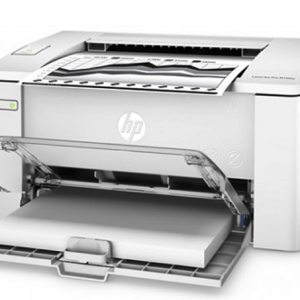
HP LASERJET PRO M28W MFP Printer
₨21,000.00
-
Specification:
Functions
-
- Functions
-
- Print, copy, scan
- Multitasking supported
- Yes
-
Printing specifications
-
- Print speed black:
- Normal: Up to 19 ppm 5
(Measured using ISO/IEC 24734, excludes first set of test documents. For more information see http://www.hp.com/go/printerclaims. Exact speed varies depending on the system configuration, software application, driver, and document complexity.)
- First page out (ready)
- Black: As fast as 7.9 sec 7
(Measured using ISO/IEC 17629. For more information see http://www.hp.com/go/printerclaims. Exact speed varies depending on the system configuration, software application, driver, and document complexity.)
- Duty cycle (monthly, A4)
- Up to 8000 pages 11
(Duty cycle is defined as the maximum number of pages per month of imaged output. This value provides a comparison of product robustness in relation to other HP LaserJet or HP Color LaserJet devices, and enables appropriate deployment of printers and MFPs to satisfy the demands of connected individuals or groups.)
- Recommended monthly page volume
- 100 to 1000
(HP recommends that the number of printed pages per month be within the stated range for optimum device performance, based on factors including supplies replacement intervals and device life over an extended warranty period.)
- Print technology
- Laser
- Print quality black (best)
- Up to 600 x 600 dpi
- Print Resolution Technologies
- HP FastRes 600
- Print languages
-
- PCLmS; URF; PWG
- Display
-
- Icon LCD with keypad: Icon LCD Graphic display(2 digit number, copy setting, Darker/Lighter, Enlargement and reduction )
- Buttons (Up, Down, ID copy, Wireless, Copy setup, Start copy, Cancel, Power);4 light-emitting diode (LED) indicator lights (Attention, Toner, Wireless, Power).
- Processor speed
- 500 MHz
- Automatic paper sensor
- Yes
- Replacement cartridges
- HP 48A LaserJet Black Toner Cartridge (~1000 pages) 3
(Declared yield value in accordance with ISO/IEC 19752 and continuous printing. Actual yields vary considerably based on images printed and other factors. For details see http://www.hp.com/go/learnaboutsupplies)
Dynamic security enabled printer. Only intended to be used with cartridges using an HP original chip. Cartridges using a non-HP chip may not work, and those that work today may not work in the future.
http://www.hp.com/go/learnaboutsupplies
-
Connectivity
-
- Mobile printing capability
- Apple AirPrint™
Google Cloud Print 2.0
Mopria-certified
Wi-Fi Direct, HP Smart App
(Apple AirPrint -Mobile device must have AirPrint®. Wireless operations are compatible with 2.4 GHz operations only. Learn more at hp.com/go/mobileprinting. Google Cloud Print™ 2.0- Requires Google Cloud Print™ registration and Google account. Wireless operations are compatible with 2.4 GHz operations only.
- Wireless capability
-
- Yes
- Connectivity, standard
-
- Hi-Speed USB 2.0 port
- built-in Wifi 802.11b/g/n
- Minimum system requirements
-
- Windows® 10, 8.1, 8, 7: 32-bit or 64-bit, 2 GB available hard disk space, CD-ROM/DVD drive or Internet connection, USB port, Internet Explorer.
- Apple®OS X EI Capitan (v10.11) macOS Sierra (v10.12) macOS High Sierra, (v10.13)
- 1.5 GB HD
- Internet required
- USB
- Compatible operating systems
- Windows® 10, 8.1, 8, 7: 32-bit or 64-bit, 2 GB available hard disk space, CD-ROM/DVD drive or Internet connection, USB port, Internet Explorer. Apple®OS X EI Capitan (v10.11) macOS Sierra (v10.12) macOS High Sierra, (v10.13)
1.5 GB HD
Internet required
USB Linux (For more information,
(Not supporting Windows® XP (64-bit) and Windows Vista® (64-bit). Not all "Compatible Operating Systems" are supported with INBOX software; Full solution software available only for Windows 7 and newer; For Windows Server 2008 R2 64-bit, 2012 64-bit, 2012 R2 64-bit, 2016 64-bit only print driver is installed. Windows RT OS for Tablets (32 & 64-bit) uses a simplified HP print driver built into the RT OS; Linux systems use in-OS HPLIP software.)
- Memory specifications
-
- Memory
- 32 MB
- Maximum memory
- 32 MB
-
Paper handling
-
- Paper handling input, standard
-
- 150-sheet input tray
- Paper handling output, standard
-
- 100-sheet output bin
- Maximum output capacity (sheets)
- Up to 100 sheets
- Media sizes supported
-
- Letter, envelopes (No. 10)
- custom
- Media sizes, custom
- 4.13 x 5.83 to 8.5 x 11.69
- Media sizes, custom
- 105 x 148 to 216 to 297 mm
- Media types
- Plain paper, envelope, postcard, Label
- Media weight, supported
- 17 to 32 lb
-
Scanner specifications
-
- Scanner type
- Flatbed
- Scan file format
- JPG, RAW (BMP), PNG, TIFF, PDF
- Scan resolution, optical
- Up to 600 ppi
- Scan size, maximum
- 216 to 297 mm
- Recommended monthly scan volume
- 250 to 2000
(HP recommends that the number of pages per month of imaged output be within the stated range for optimum device performance, based on factors including supplies replacement intervals and device life over an extended warranty period.)
- Scan input modes
-
- Scanning via HP LaserJet Software Scan or TWAIN-compliant or WIA-compliant software
-
Copier specifications
-
- Copy speed (normal)
- Black: Up to 19 cpm
(First Copy Out and Copy Speed measured using ISO/IEC 29183, excludes first set of test documents. For more information see http://www.hp.com/go/printerclaims. Exact speed varies depending on the system configuration, software application, driver, and document complexity.)
- Copy resolution (black text)
- 600 x 400 dpi
- Copy reduce / enlarge settings
- 25 to 400%
- Copies, maximum
- Up to 99 copies
-
Power and operating requirements
-
- Power
- 110V - 127V nominal @ +/-10% (min 99V, max 140V), 50 - 60Hz nominal +/- 3Hz (min 47Hz, max 63Hz), 220V - 240V nominal @ +/-10% (min 198V, Max 264V), 50 - 60Hz nominal +/- 3Hz (min 47Hz, max 63Hz)
- Power consumption
- 365 watts (active printing), 2.9 (ready), 0.6 watts (sleep), 0.1 watts (Auto-off /Manual on) , 0.1 watts (manual off), 0.6 watts (Auto-off/Wake on USB)
- Energy efficiency
-
- ENERGY STAR® qualified
- EPEAT® Silver
- Blue Angel compliant
-
- Yes
- Blue Angel RAL-UZ 205
- Operating temperature range
- 15 to 32.5ºC
- Recommended operating humidity range
- 30 to 70% RH
- Acoustic power emissions (ready)
- 2.6 B(A)
- Acoustic pressure emissions bystander (active, printing)
- 52 dB(A)
-
Dimensions and weight
-
- Minimum dimensions (W x D x H)
- 14.2 x 10.4 x 7.8 in
- Maximum dimensions (W x D x H)
- 14.2 x 16.8 x 13.7 in
- Weight
- 11.9 lb
- Package weight
- 6.9 kg
Description
HP LASERJET PRO M28W MFP Printer
HP LASERJET PRO M28W MFP Printer
- he perfect fit for virtually any space and budget – the world’s smallest laser in its class.1 Print, scan, and copy, produce professional-quality results, and print and scan from your smartphone.
- Dynamic security enabled printer. Only intended to be used with cartridges using an HP original chip. Cartridges using a non-HP chip may not work, and those that work today may not work in the future.
Features
Productivity that fits anywhere
- Easily handle tasks and get a lot from one device – print, scan, and copy.
- Maximize your uptime with print speeds up to 19 ppm.
- Easily scan files directly to PDF and email with preloaded business apps.
- Easily copy both sides of identification cards onto one side of paper.
Uncompromising quality
- Help save energy with HP Auto-On/Auto-Off Technology.
- Speed through print jobs, using pre-installed Original HP Toner cartridges.
Easy mobile printing and scanning with HP Smart app
- Print from the cloud, scan from your smartphone, and easily order toner, with the HP Smart app.
- Easily print from a variety of smartphones and tablets.
- Easily share resources – access and print with wireless networking.
- Connect your smartphone directly to your printer – and easily print without accessing a network.
Specification:
Functions
-
- Functions
-
- Print, copy, scan
- Multitasking supported
- Yes
-
Printing specifications
-
- Print speed black:
- Normal: Up to 19 ppm 5
(Measured using ISO/IEC 24734, excludes first set of test documents. For more information see http://www.hp.com/go/printerclaims. Exact speed varies depending on the system configuration, software application, driver, and document complexity.)
- First page out (ready)
- Black: As fast as 7.9 sec 7
(Measured using ISO/IEC 17629. For more information see http://www.hp.com/go/printerclaims. Exact speed varies depending on the system configuration, software application, driver, and document complexity.)
- Processor speed
- 500 MHz
- Automatic paper sensor
- Yes
- Replacement cartridges
- HP 48A LaserJet Black Toner Cartridge (~1000 pages)
(Declared yield value in accordance with ISO/IEC 19752 and continuous printing. Actual yields vary considerably based on images printed and other factors. For details see http://www.hp.com/go/learnaboutsupplies)
Dynamic security enabled printer. Only intended to be used with cartridges using an HP original chip. Cartridges using a non-HP chip may not work, and those that work today may not work in the future.
http://www.hp.com/go/learnaboutsupplies
-
- Compatible operating systems
- Windows® 10, 8.1, 8, 7: 32-bit or 64-bit, 2 GB available hard disk space, CD-ROM/DVD drive or Internet connection, USB port, Internet Explorer. Apple®OS X EI Capitan (v10.11) macOS Sierra (v10.12) macOS High Sierra, (v10.13)
1.5 GB HD
Internet required
USB Linux (For more information,
(Not supporting Windows® XP (64-bit) and Windows Vista® (64-bit). Not all “Compatible Operating Systems” are supported with INBOX software; Full solution software available only for Windows 7 and newer; For Windows Server 2008 R2 64-bit, 2012 64-bit, 2012 R2 64-bit, 2016 64-bit only print driver is installed. Windows RT OS for Tablets (32 & 64-bit) uses a simplified HP print driver built into the RT OS; Linux systems use in-OS HPLIP software.)
Specification
Additional information
| Weight | 4 kg |
|---|